
AV Over IP
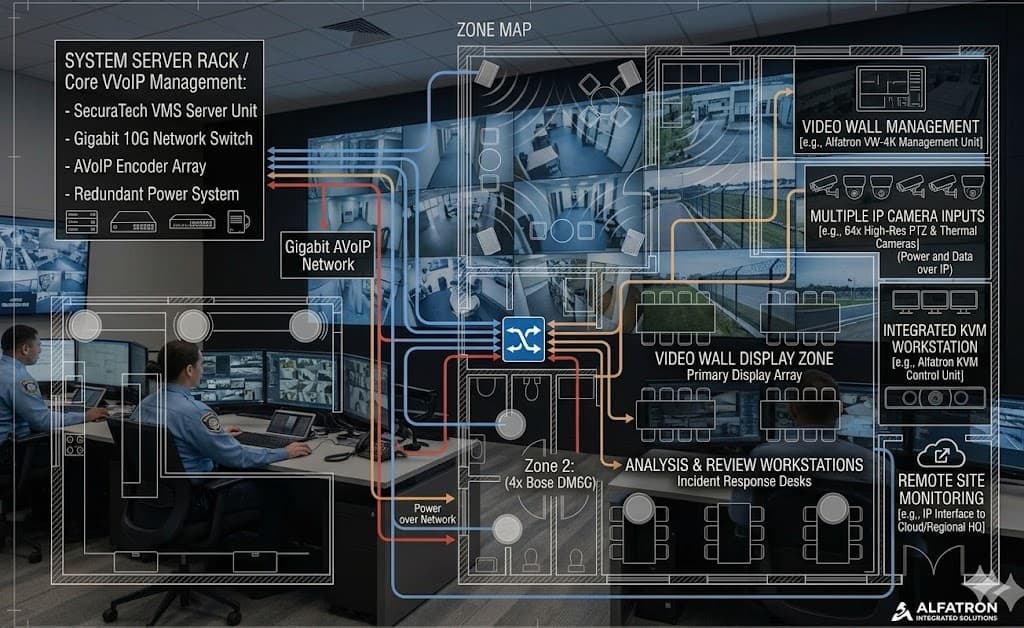
AV over IP:
Drag-and-Drop Source Routing
Route any video source to any screen in your building — from your iPad. No signal cables between rooms, no matrix switchers, no AV engineer on call.
Traditional AV distribution meant running dedicated HDMI or SDI cables between every source and every screen — a rigid, expensive, and inflexible setup. AV over IP replaces all of that with your existing network infrastructure. Sources encode to the network, screens decode from it, and a tablet app lets you drag any source to any screen in real time. Change your signal routing without touching a single cable.
How AV over IP Works
Every source gets a small encoder box. Every screen gets a decoder box. Both connect to your IP network — the same infrastructure your data runs on. A software controller on an iPad gives you a live preview of all sources and a simple drag-to-assign interface for routing.
Where AV over IP Makes the Difference
Hotels & Hospitality
Route satellite channels, digital signage, or live event feeds to any TV in the property. Change what's playing in the lobby from the front desk.
Corporate Campuses
Share boardroom presentations to overflow rooms, broadcast company announcements across all floors, or put digital signage on any display — without new cabling.
Sports Bars & Entertainment
Show any sports channel on any screen. Change the match on screen 5 without touching the cables behind it. Run different channels in different zones.
Education & Training
Broadcast a lecturer's screen to overflow rooms. Share content from any room to any room on the network. Record and restream simultaneously.
Retail & Showrooms
Centralise digital signage content management. Update all screens from one place. Run promotional content on some screens and product demos on others.
Healthcare & Government
Patient information, wayfinding, and broadcast communications distributed to any display on the premises — from one secure control point.
Four Reasons to Move Beyond Dedicated Cabling
Use Existing Infrastructure
AV over IP runs on the same Gigabit Ethernet network your data already uses. No new dedicated cabling runs, no AV-specific matrix switchers — your existing network investment carries the signal.
Unlimited Scalability
Adding a new display means adding one decoder box and plugging it into a network port. Adding a new source means one encoder. Scale from 4 screens to 400 without redesigning the system.
Flexible Routing
Any source can feed any screen, at any time, from anywhere. One satellite feed can simultaneously appear on 50 screens. Change routing in seconds from an iPad — no cables, no ladders.
H.265 Video Quality
H.265 (HEVC) compression delivers broadcast-quality 4K video at bandwidth levels that won't overwhelm your network. Ultra-low latency encoding means real-time video without delay.
AV over IP vs. Traditional Matrix Switching
AV over IP — Key Specifications
| Parameter | Specification |
|---|---|
| Video Codec | H.265 / HEVC (also H.264 compatible) |
| Resolution | Up to 4K UHD @ 60fps |
| Latency | <100ms end-to-end (ultra-low latency mode) |
| Network requirement | Gigabit Ethernet (1Gbps switch recommended) |
| VLAN support | Yes — AV traffic can be isolated from data traffic |
| Multicast | IGMP snooping — one source feeds unlimited screens |
| Control interface | iOS / Android app, web browser, RS-232, API |
| Audio | Embedded HDMI audio, AES67 IP audio optional |
Plan Your AV Distribution System
Audico maps your building, counts your sources and displays, and designs the right AV over IP architecture — fully documented and quoted.
Get an AV Distribution Plan →